Republican Debate: Analyzing the Details – The New York Times

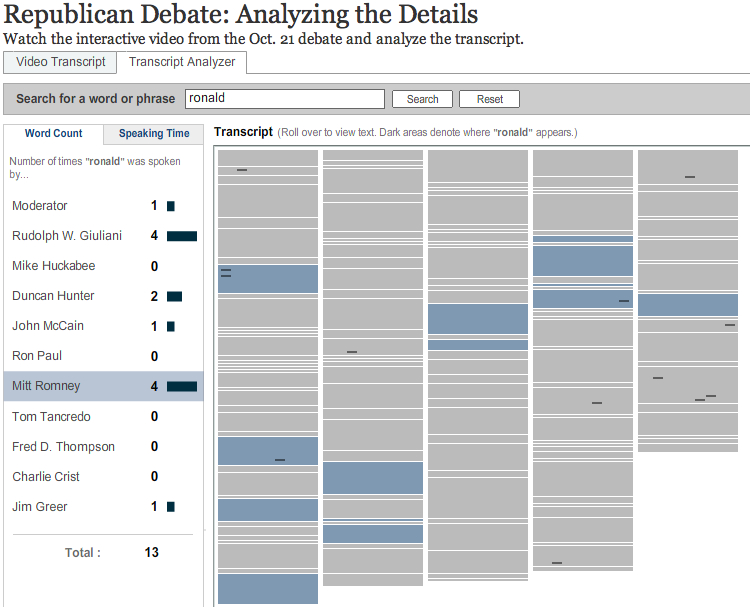
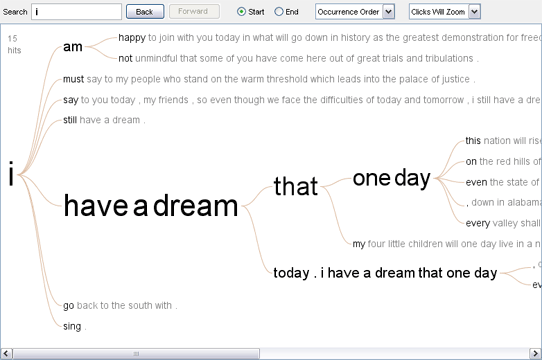
Screen Image The New York Times has created another neat text visualization, this time for the Republican Debate. The visualization has two panels. One shows the video, a transcript, and sections. You can jump the video using the transcript or section outline. The other is a “Transcript Analyzer” where you can see a rich prospect of the debate divided by speeches and you can search for words. What is missing is some sort of overview of what the high frequency words are and how they collocate.

So, I have created a public text for analysis in TAPoR and here are some results. Here is a list of words that are high frequency generated using the List Words tool. Some interesting words:

People (76), Think (66), Know (48), Giuliani (42), Clinton (33), Reagan (13), Democrats (16), Republicans (11)

Health (45), Government (35), Security (35), Country (25), Policy (16), Military (15), School (15),

Marriage (23), Insurance (23), Conservative (23), Private (22), Let (21), Gay (12)

Iraq (13), Iran (12), Turkey (7), Canada (2), Darn (2), Europe (5),

Immigrants (5), Citizens (2)

Man (7), Mean (7), Woman (4), Congressman (25)

Answer (10), Problem (10), Solution (5), War (12)

Continue reading Republican Debate: Analyzing the Details – The New York Times

Plagiarism and The Ecstasy of Influence

Jonathan Lethem had a wonderful essay, The Ecstasy of Influence: A Plagiarism, in the February 2007 Harpers. The twist to the essay, which discusses the copying of words, gift economies, and public commons, was that it was mostly plagiarized – a collage text – something I didn’t realize until I got to the end. The essay challenges our ideas of academic integrity and plagiarism.

In my experience plagiarism has been getting worse with the Internet. There are now web sites like Customessay.org where you can buy customized essays for as low as $12.95 a page. Do the math – a five page paper will probably cost less than the textbook and it won’t get detected by services like Turn It In.

These essay writing companies actually offer to check that the essay you are buying isn’t plagiarized. Here is what Customessay.org says about their Cheat Guru software:

Custom Essay is using the specialized Plagiarism Detection software to prevent instances of plagiarism. Furthermore, we have developed the special client module and made this software accessible to our customers. Many companies claim to utilize the tools of such kind, few of them do and none of them offer their Plagiarism Detection software to their customers. We are sure about the quality of our work and provide our customers with effective tools for its objective assessment. Download and install our Cheat Guru and test the quality of the products you receive from us or elsewhere.

Newspapers have been running stories on plagiarism like JS Online: Internet cheating clicks with students connecting it to ideas from a book by David Callahan, The Cheating Culture (see the archived copy of the Education page that was on his site.)

There is a certain amount of research on plagiarism on the web. A place to start is the The Plagiarism Resource Site or the University of Maryland College’s Center for Intellectual Property page on Plagiarism.

I personally find it easy to catch students who crib from the web by using Google. When I read a shift in writing professionalism I take a sequence of five or so words and Google the phrase in quotations marks. Google will show me the web page the sequence came from. The trick is finding a sequence short enough to not be affected by paraphrasing while long and unique enough to find a web site the student used. This Salon article, “The Web’s plagiarism police” by Andy Dehnart, talks about services and tools that do similar things.

Perhaps the greatest use of these plagiarism catching tools is that they might show us how anything we write is woven out of the words of others. It’s possible these could be adapted to show us the web of connections radiating out from anything written.

Note: This entry was edited in Feb. 2018 to fix broken links. Thanks to Alisa from Plagiarism Check for alerting me to the broken links.
Kirschenbaum: Hamlet.doc?

Matt Kirschenbaum has published an article in The Chronicle of Higher Education titled, Hamlet.doc? Literature in a Digital Age (From the issue of August 17, 2007.) The article nicely summarizes teases us with the question of what we scholars could learn about the writing of Hamlet if Shakespeare had left us his hard-drive. Kirschenbaum has nicely described and theorized the digital archival work humanists will need to learn to do in his forthcoming book from MIT Press, Mechanisms. Here is the conclusion of the Chronicle article,

Literary scholars are going to need to play a role in decisions about what kind of data survive and in what form, much as bibliographers and editors have long been advocates in traditional library settings, where they have opposed policies that tamper with bindings, dust jackets, and other important kinds of material evidence. To this end, the Electronic Literature Organization, based at the Maryland Institute for Technology in the Humanities, is beginning work on a preservation standard known as X-Lit, where the “X-” prefix serves to mark a tripartite relationship among electronic literature’s risk of extinction or obsolescence, the experimental or extreme nature of the material, and the family of Extensible Markup Language technologies that are the technical underpinning of the project. While our focus is on avant-garde literary productions, such literature has essentially been a test bed for a future in which an increasing proportion of documents will be born digital and will take fuller advantage of networked, digital environments. We may no longer have the equivalent of Shakespeare’s hard drive, but we do know that we wish we did, and it is therefore not too late ‚Äî or too early ‚Äî to begin taking steps to make sure we save the born-digital records of the literature of today.

Mashing Texts and Just in Time Research

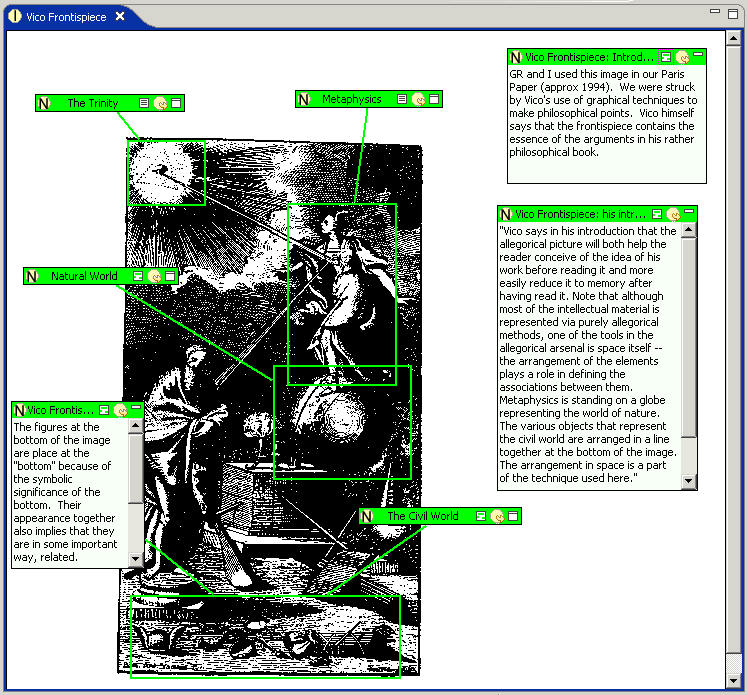
Screen Shot from PowerPointWith colleagues Stéfan Sinclair, Alexandre Sevigny and Susan Brown, I recently got a SSHRC Research and Development Initiative grant for a project Mashing Texts. This project will look at “mashing” open tools to test ideas for text research environments. Here is Powerpoint File that shows the first prototype for a social text environment based on Flickr.
From the application:

The increasing availability of scholarly electronic texts on the internet makes it possible for researchers to create “mashups” or combinations of streams of texts from different sources for purposes of scholarly editing, sociolinguistic study, and literary, historical, or conceptual analysis. Mashing, in net culture, is reusing or recombining content from the web for purposes of critique or creating a new work. Web 2.0 phenomena like Flickr and FaceBook provide public interfaces that encourage this recombination (see “Mashup” article and Programmableweb.com.) Why not recombine the wealth of electronic texts on the web for research? Although such popular social networking applications as mashups seem distant from the needs of humanities scholars, in many ways so-called mashups or repurposing of digital content simply extend the crucial principle developed in humanities computing for the development of rich text markup languages: that content and presentation should be separable, so that the content can be put to various and often unanticipated uses.

Mashing Texts will prototype a recombinant research environment for document management, large-scale linguistic research, and cultural analysis. Mashing Texts proposes to adapt the document repository model developed for the Text Analysis Portal for Research (TAPoR) project so that a research team interested in recombinant documents can experiment with research methods suited to creating, managing and studying large collections of textual evidence for humanities research. The TAPoR project built text analysis infrastructure suited to analysis of individual texts. Mashing Texts will prototype the other side of the equation ��� the rapid creation of large-scale collections of evidence. It will do this by connecting available off-the-shelf open-source tools to the TAPoR repository so that the team can experiment with research using large-scale text methods.

Scholarly Work in the Humanities and the Evolving Information Environment

John Bradley’s abstract for his talk at this year’s Digital Humanities conference, Thinking Differently About Thinking: Pliny and Scholarship in the Humanities pointed me to one of the better discussions about what we know about how humanities scholars do research. Scholarly Work in the Humanities and the Evolving Information Environment is a CLIR report that is available in HTML and PDF. The thing that stands out for me reading this is that humanists are readers (and writers.) Reading is research and writing is research. As John puts it when he talks about Pliny, the hard thing to pin down is when we shift from Reading/Interpreting to Interpreting/Writing. It is that turn when you think you can respond to what you have read that is what Pliny (and other types of notetaking software like Tinderbox) is supposed to help with. If you have invested the time in taking notes while reading then those notes become useful to writing.

Davidson: Data Mining, Collaboration, and Institutional Infrastructure for Transforming Research and Teaching in the Human Sciences and Beyond

Cathy Davidson has a summary article in CTWatch Quarterly titled, Data Mining, Collaboration, and Institutional Infrastructure for Transforming Research and Teaching in the Human Sciences and Beyond. The article makes some good points about how we have to rethink research in the humanities in the face of digital evidence.

Bibliographic work, translation, and indexical scholarship should also have a place in the reward system of the humanities, as they did in the nineteenth century. The split between “interpretation” or “theoretical” or “analytical” work on the one hand and, on the other, “archival work” or “editing” falls apart when we consider the theoretical, interpretive choices that go into decisions about what will be digitized and how. Do we go with taxonomy (formal categorizing systems as evolved by trained archivists)? Or folksonomy (categories arrived at by users, many of which offer less precise organization than professional indexes but often more interesting ones that point out ambiguities and variabilities of usage and application)?

We also need to rethink paper as the gold standard of the humanities. If scholarship is better presented in an interactive 3-D data base, why does the scholar need to translate that work to a printed page in order for it to “count” towards tenure and promotion? It makes no sense at all if our academic infrastructures are so rigid that they require a “dumbing down” of our research in order for it to be visible enough for tenure and promotion committees.

Davidson talks about a first generation digital humanities and then makes a Web 2.0 argument about the overwhelming amount of data being gathered and new paradigms. I’m not convinced she really understands the achievements of the first generation, if there is such a clear generational division, there is no mention of the TEI or the work on literary text analysis and publishing.

Blacklight: Faceted searching at UVA

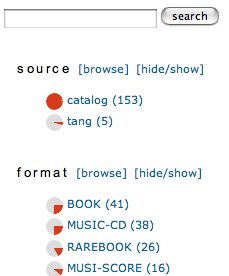
Screen capture of BlacklightBlacklight is a neat project that Bethany Nowviskie pointed me to at the University of Virginia. They have indexed some 3.7 million records from their library online catalogue and set up a faceted search and browse tool.

What is faceted searching and browsing? Traditionally search environments like those for finding items in a library have you fill in fields. In Blacklight you can both search with words, but you can also add constraints by clicking on categories within the metadata. So, if I search for “gone with the wind” in Blacklight it shows that there are 158 results. On right it shows how those results are distributed over different categories. It shows me that 41 of these are “BOOK” in the category “format”. If I click on “BOOK” it then adds a constraint and updates the categories I can use further. Backlight makes good use of inline graphics (pie charts) so you can see at a glance what percentage of the remaining results are in what category type.

This faceted browsing is a nice example of a rich-prospect view on data where you can see and navigate by a “prospect” of the whole.

Blacklight came out of work on Collex. It is built on Flare which harnesses Solr through Ruby on Rails. As I understand it, Blacklight is also interesting as an open-source experimental alternative to very expensive faceted browsing tools that comes out of the Collex project. It is a “love letter to the Library” from a humanities computing project and its programmer.

YEP: PDF Broswer

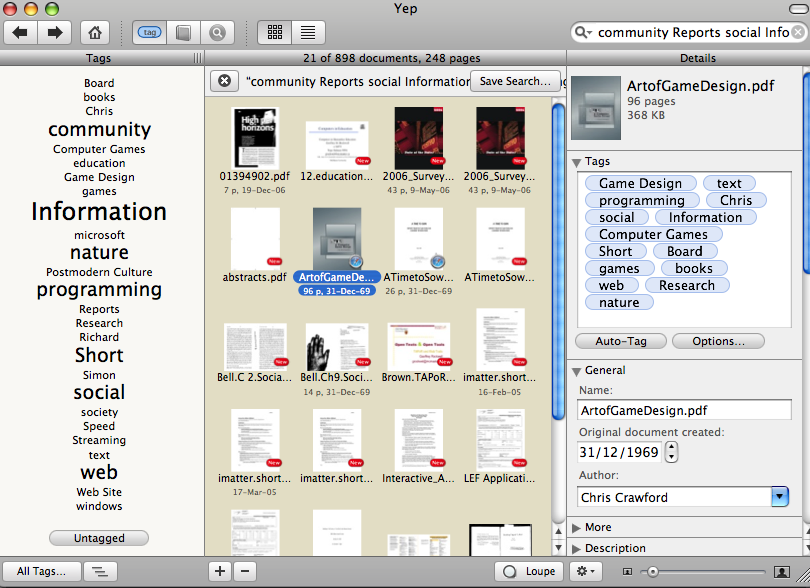
Screen of YepYep is the best new software I’ve come across in a while. Yep is to PDFs on your Mac as iPhoto is to images and iTunes is to music – a well designed tool for managing large collections of PDFs. Yep can automatically load PDFs from your hard drive, search across them, tag them and let you assign tags with which to organize them. It also lets you move them around (something I wish iPhoto did) and export them to other viewers, e-mail and print.

Thanks to Shawn for pointing me to this.